Data distribution & metrics
Table of Contents
Overview
On the physical level, Onedata organizes files into blocks of various sizes. These file blocks can then be distributed across different storage backends that support the space in which the files are stored. Each provider stores the local file blocks, forming a file replica. Information about the mapping between logical and physical files is stored in the file metadata, which is replicated and synchronized between all supporting providers.
A file can have multiple replicas on different storage backends. This has the following benefits:
- Improved performance — when interacting with the data available locally on the provider where it is needed.
- Data loss prevention — data copies distributed across multiple physical locations provide redundancy.
- Compliance with policies — ensuring the data is stored in particular geographical locations.
- Better collaboration — users can collaborate and modify shared files on different sites, knowing that the changes will be synchronized.
The data in spaces may be arbitrarily distributed among the storage backends of the supporting providers.
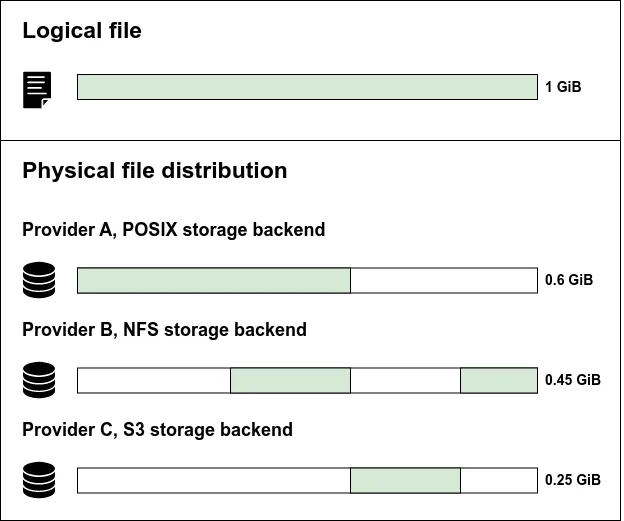
On-the-fly data delivery
When you use any interface to read a whole file or part of it, the connected provider serves the data transparently, independent of its physical distribution. If the requested blocks are missing, they are automatically replicated on the fly from other providers. This process happens in the background and does not require user intervention.
When you write to a file in a given provider, the conflicting parts of overlapping blocks replicated to other providers are invalidated. To read the file, the provider with invalidated blocks must once again replicate missing blocks from the provider with the newest version of the blocks.
File modification impact on replica
Simultaneous modifications of a file may occur when many users write to it. If the ranges of simultaneous modifications do not overlap, all modifications are safely applied. Otherwise, a conflict resolution algorithm is used. This allows all supporting providers to determine a consistent, final version of the file. Conflict resolution is performed independently by each provider without the need to coordinate the resolution with other supporting providers, which allows it to be fast. From the user perspective in such a case final file content may be different from expectation, as the algorithm decides which change will find itself in a file. The only guarantee is that the file content is coherent between providers. Therefore, simultaneous modification of the same file is discouraged.
Distribution management
Data distribution is about controlling the physical location of data fragments and is applicable for spaces with at least two provider supports. You can manage the data distribution using:
Data transfers
Data transfer is a process of moving physical data between providers within a Onedata space. It is used to control the data distribution of a logical file/directory.
Transfers can be initiated:
-
automatically:
- On-the-fly — when a data read is requested, but the provider does not have the corresponding blocks.
- QoS transfer — when the provider detects that a QoS requirement is not met.
-
manually — upon the explicit request of a user with sufficient privileges.
Auto-cleaning
Auto-cleaning automatically maintains storage usage at a predefined level, creating freeing storage capacity for new replicas during continuous computations.
Auto-cleaning can only be configured by a space admin.
Viewing data distribution
If files are not yet fully synchronized between providers, the reported data distribution may temporarily differ between them.
You can view how the data is distributed among storage backends supporting the space in which it is stored like below:
Web GUI
Open the context menu for the file and choose Data distribution:
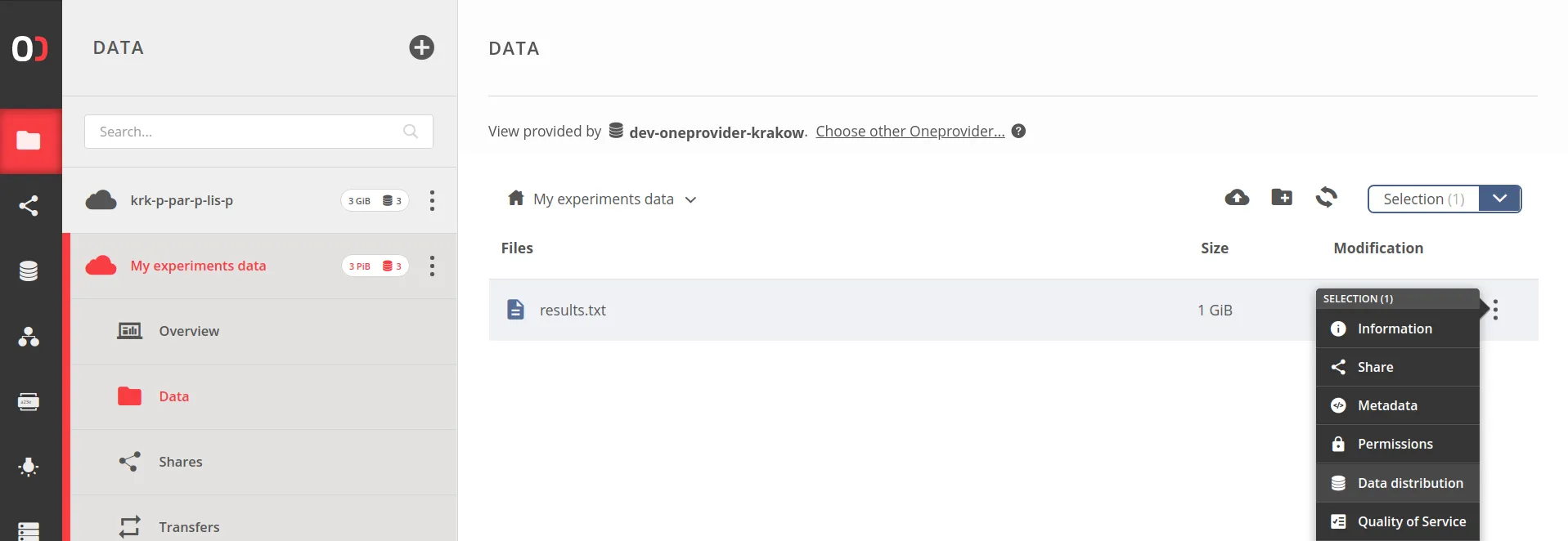
and you will see Data distribution modal, representing the distribution of file blocks:
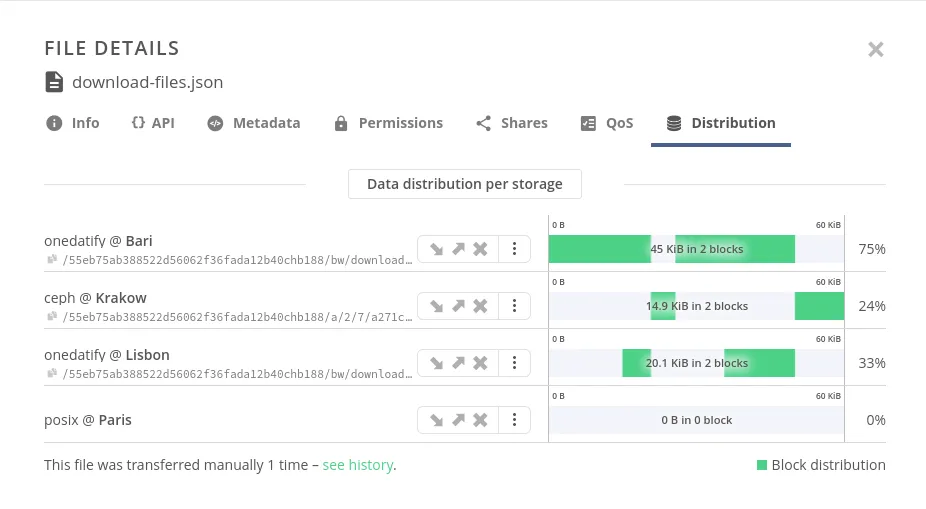
The view of data distribution for directories differs slightly from the view for files; instead of the layout of blocks, there is a replication ratio:
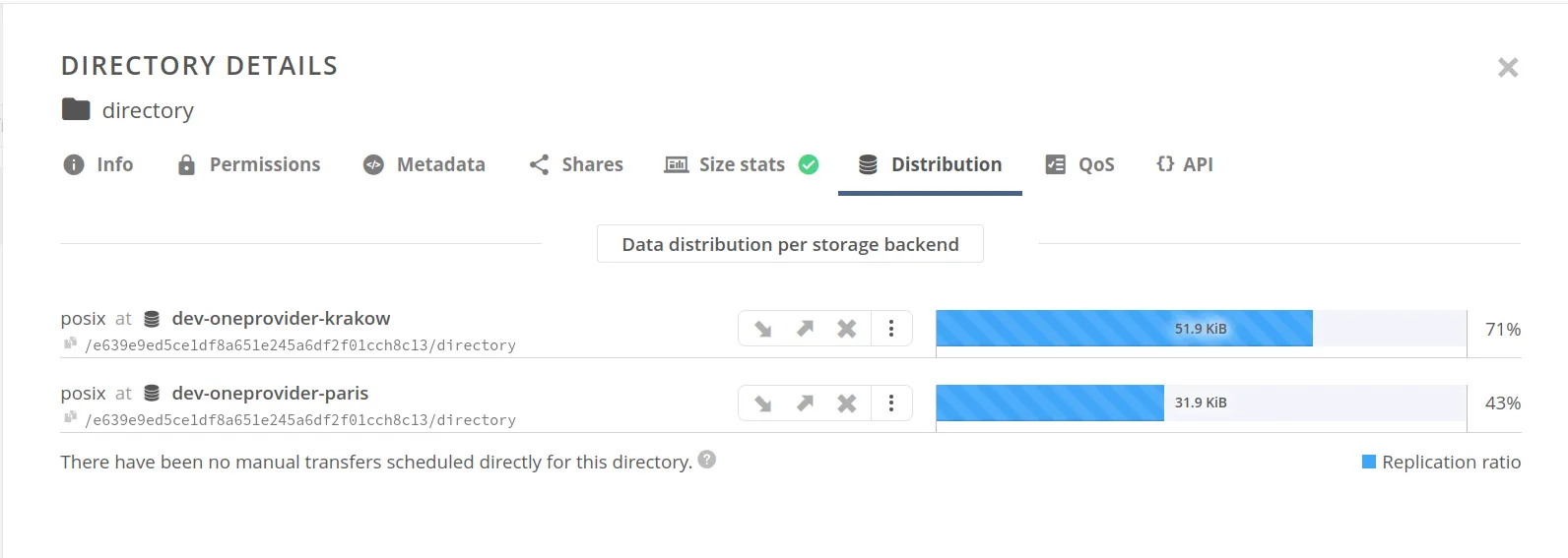
The size displayed here represents the logical size calculated as part of the directory size statistics.
To view distribution for directories directory size statistics have to be enabled by the space manager or Oneprovider admin.
REST API
Data distribution can be accessed using the REST API. Refer to the linked API documentation for detailed information and examples.
| Request | Link to API |
|---|---|
| Get data distribution | API |
| Get file storage locations | API |
Oneclient
Check file extended attributes and inspect org.onedata.file_blocks,
org.onedata.file_blocks_count and org.onedata.replication_progress attributes:
~$ xattr -l results.txt

org.onedata.file_blocks: [#######################################.         ]
org.onedata.file_blocks_count: 1
org.onedata.replication_progress: 80%
...Extended attributes present only information about file blocks stored in the provider to which the Oneclient is connected. To find information about replicas of the file in other providers, use the Web GUI or REST API (see above).
Only data distribution for regular files is available with this method.